A holiday auto-reply answers every email you receive while you are away, between a start date and an end date that you choose. Each sender receives the auto-reply only once every 24 hours, so a client who emails you three times in one afternoon receives the auto-reply once.
In the message, say when you will be back and, if someone is covering for you, give that person’s name and email address. If you are not logged in to webmail yet, see Log in to Webmail first.
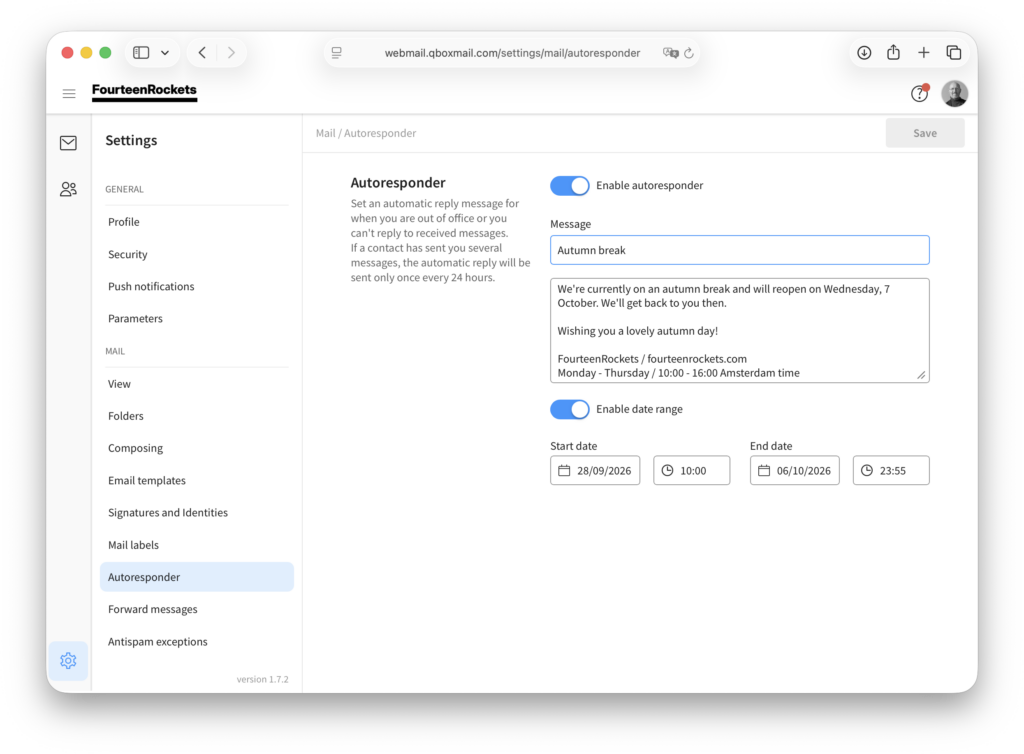
- Click the settings icon in the bottom left corner of webmail.
- Select ‘Autoresponder’ under ‘Mail’.
- Turn on ‘Enable autoresponder’.
- Type a subject, for example ‘Out of office until 24 August’.
- Type your message.
- Turn on ‘Enable date range’.
- Select the start date and time.
- Select the end date and time.
- Click ‘Save’ in the top right corner.
The auto-reply is now sent to everyone who emails you between the start date and the end date. To check that the auto-reply works, ask a colleague to send you an email once the start date has passed.
To turn off the auto-reply before the end date, open ‘Autoresponder’ again, turn off ‘Enable autoresponder’ and click ‘Save’.