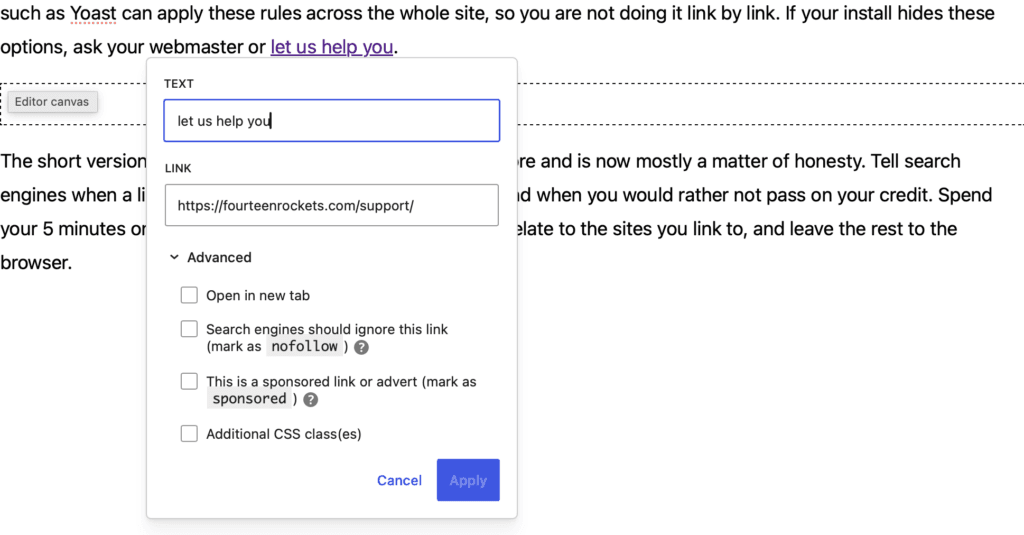
Most links need none of the boxes under ‘Advanced’ in the WordPress link panel. Only two kinds of link call for a box: a link that exists because of payment or an arrangement, and a link to a page that you would rather not have your website associated with.
The labels in this article are the ones shown when the Yoast SEO plugin is installed, as on the websites we build. Without Yoast, WordPress shows a single box, ‘Mark as nofollow’.
When should a link be marked as sponsored?
Tick ‘This is a sponsored link or advert (mark as sponsored)’ when the link is an advertisement or a paid placement. Google asks for this label on links that exist because of payment. For an LGBTQ+ organisation, the most common case is a sponsor or funder whose agreement requires a link on your website, which is best marked as sponsored even though it does not look like an advertisement. A link to a funder that you add only to thank them needs no box.
When should a link be marked as nofollow?
Tick ‘Search engines should ignore this link (mark as nofollow)’ when you link to a page that you would rather not have your website associated with, for example a page that you quote in order to disagree with it. The link works for visitors in exactly the same way, and only search engines treat it differently.
The first box, ‘Open in new tab’, is explained in Opening links in a new tab in WordPress. The last box, ‘Additional CSS class(es)’, changes how a link looks and is used by developers.