The simple, unwritten rule of user-friendliness is as follows: Links to pages or posts on your own website should never open in a new tab. Links to other websites, or to PDFs for example, should always open in a new tab.
This way, there is less chance that your visitors will lose their way. Once they have finished reading the article on the linked website, they close that tab, leaving your website open in the tab below.
When adding a link to a page or post on your own website, you do not need to change any settings as the link opens in the same tab by default.
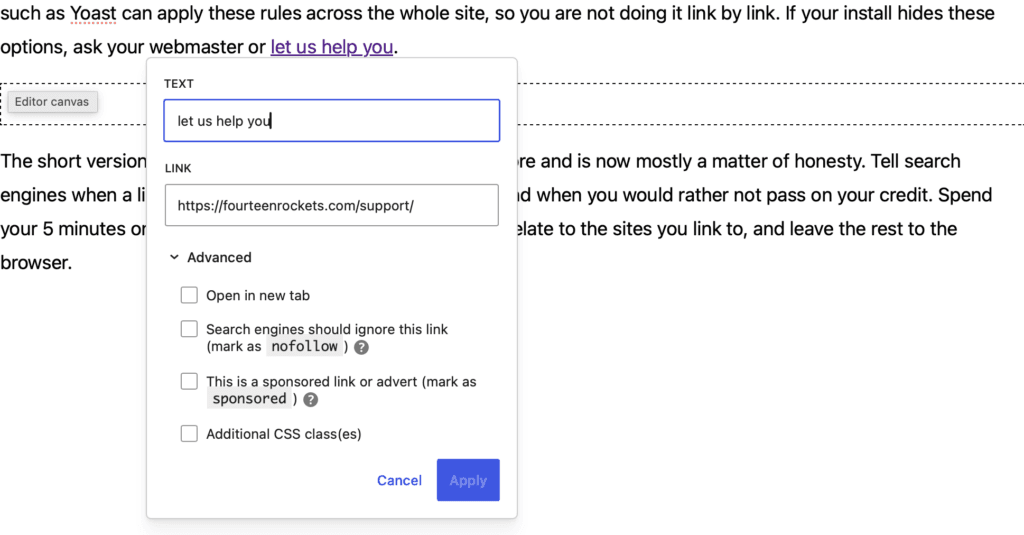
Want to link to another website? Then turn on the ‘Open in new tab’ setting for that particular link:
- Select the text you want to turn into a link.
- Click the link button in the toolbar above the block.
- Paste the address of the other website and press Enter or click the ‘Submit’ icon to the right.
- Click the link once more, then click the pencil icon to edit it.
- Open ‘Advanced’ and turn on ‘Open in new tab’.
- Click Apply.
The same setting applies to a PDF or any other file you link to.