When you add a link in WordPress and open the Advanced options, you are given a few tick boxes and very little explanation of what they do. Most of the links you add will not need any of them, which is worth knowing before you start second-guessing every one. Here is what each box is for, and when it is worth ticking.
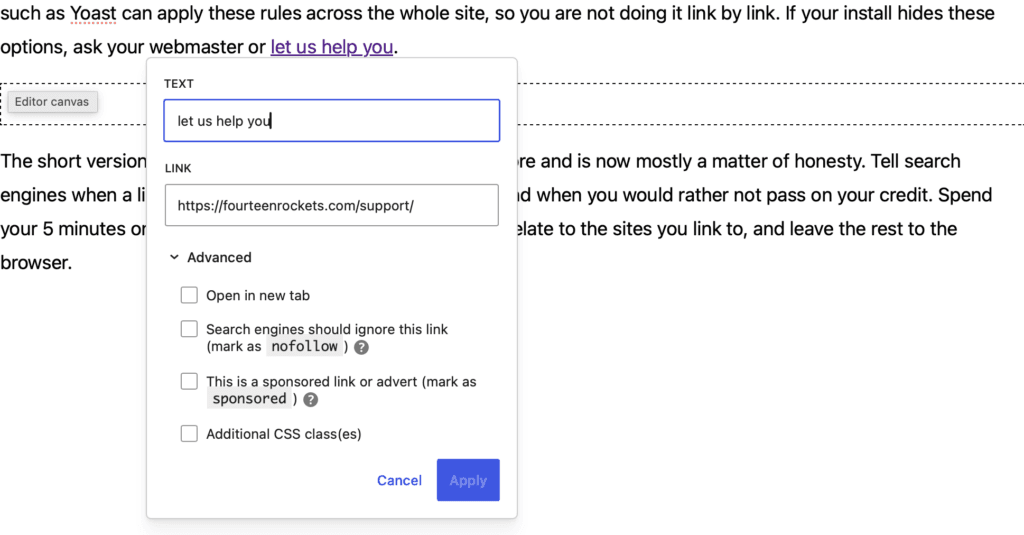
Open in new tab: yes for other websites, no for your own
This is the box you will meet most often, and there is a simple rule that takes the guesswork out of it. When you link to another page on your own website, leave it unticked, so the page opens in the same tab. When you link to someone else’s website, tick it, so their page opens in a new one.
The reason comes down to not surprising your reader. Inside your own site, people expect to move from page to page in the same tab, with the back button doing what it always does. If every internal link suddenly opened a new tab, you would leave them with a pile of tabs and a back button that no longer takes them where they expect. Linking to another website is the opposite case: opening it in a new tab keeps your own site sitting there in the background, so your reader can have a look and then come straight back to where they were.
There is a small technical bonus here that you do not have to think about. The moment you tick this box, WordPress quietly adds rel="noopener noreferrer" to the link, which is the part that stops the other site from interfering with yours. Modern browsers do the same thing on their own in any case. So the security side is handled for you, and the only real decision left is the one above: your site, same tab; someone else’s site, new tab.
Search engines should ignore this link (nofollow)
Ticking this box adds rel="nofollow" to the link. In plain terms, it tells search engines not to pass any of your site’s standing on to the page you are linking to. It does not stop anyone clicking the link, and it does not change how the link looks or works. It only changes what search engines make of it.
For most of the links an organisation adds, you can leave this alone. When you link to a funder, a partner, a piece of news coverage about your work, or your own donation page, a plain link is exactly right. Linking to them normally is a small vote of confidence, which is what you mean by it.
Tick it when you are linking to something you would rather not put your name behind. Perhaps you are quoting a page in order to disagree with it, or pointing to a source you are unsure about, or linking somewhere because you feel you have to rather than because you want to. In those cases, nofollow lets you include the link without lending it your credibility. If the link is there because someone paid for it, the next box is the one you want instead.
This is a sponsored link or advert (sponsored)
Ticking this box adds rel="sponsored", the label Google asks you to use whenever a link exists because of money or an arrangement. An advert, a paid placement, or a link a sponsor receives as part of what they fund all belong in this group.
This is the one I find catches organisations out, so it is worth a moment. If a grant or a partnership comes with a line like “and you add a link to us on your website”, that link is technically sponsored, even though it feels nothing like advertising. Marking it honestly is not an admission of anything. It simply tells Google the link was arranged rather than earned, and that protects both your site and the sponsor’s. If you are linking to a funder purely to thank them, with no link required in return, a plain link is fine.
One more you will read about: links in comments (ugc)
There is a fourth value you may come across, rel="ugc", which stands for user generated content. It is meant for links that your visitors add themselves, in comments or a forum, where you had no say over where they point. You will not see a box for it in the link options, because WordPress adds it to comment links on its own. Unless you are running a forum plugin that asks you to set this up, it takes care of itself.
The last box in the Advanced section, Additional CSS class(es), is for styling a link rather than telling search engines anything, so it does not come into this at all.
The reassuring part in all of this is that most links you add need nothing ticked. The boxes are there for the handful of moments when your relationship to a link is genuinely different: when you cannot quite vouch for where it goes, or when a deal is the reason it is there. Tick a box when the honest answer calls for it, and leave the rest to WordPress and the browser. If the options look different in your version of WordPress, or you would like a hand setting them up, we are happy to help.